Build Your Child's Own Alphabet App (Free, in 5 Minutes)
No subscriptions, no ads, works in any language. Just one prompt.
Save or print this guide. No signup needed.
Hey, it’s Žana. I’m a mom of two girls, and I run AI with Žana. I teach moms how to use AI to save time and money in everyday life.
I was tired of paying for learning apps that weren’t even in our language, so I built my daughter her own with AI in 5 minutes. Now she asks to practice her letters. And the best part? You can make one for your little one too. 💛
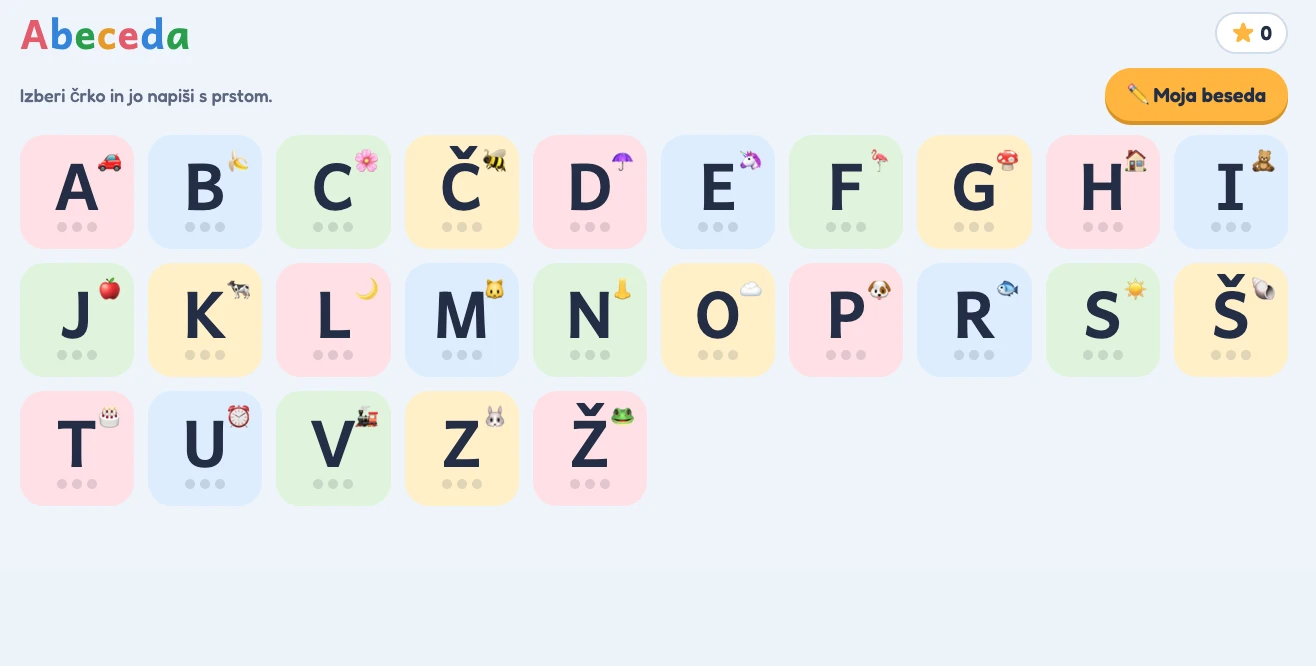
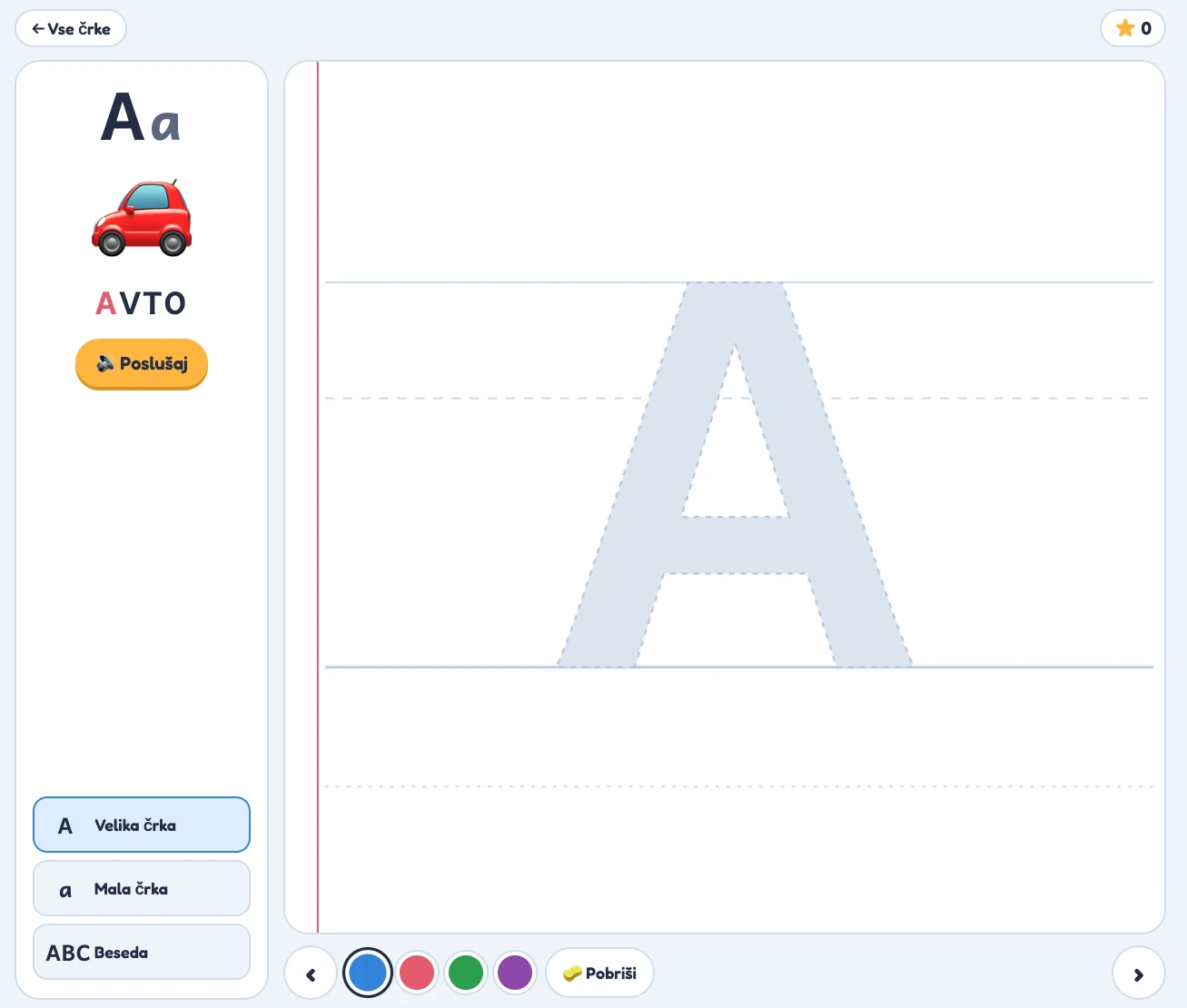
A little peek at our app
This is the Slovenian version I made for my daughter. Yours can use your own language, words and favorite things. 💛
What the app does
- Every letter of your alphabet, with a picture and a word
- Your child traces letters with a finger on the tablet
- Says letters and words out loud
- Stars, “Bravo!” and confetti when they get it right
- Uppercase, lowercase and whole words
- Works in ANY language, with no download, ads or account for your child
What you need
- A free Claude account (claude.ai)
- An iPad, tablet or phone with a browser
- 5 minutes
Let’s build it, step by step
- Go to claude.ai and log in.
- Copy the prompt below and fill in the parts in [BRACKETS].
- Paste it into Claude and press send.
- Claude builds the app. Open it and test it yourself first.
- Open the link on your child’s tablet in Safari or Chrome.
- Bonus: tap Share → “Add to Home Screen” so it opens like a real app.
For the tablet link, publish or share the finished app in Claude first. If Claude gives you a file instead, ask it how to open or share that file on your tablet.
Copy this prompt
Tap Copy, then replace [AGE] and [LANGUAGE]. Add your child’s name and favorite things, or remove those optional lines.
Build me an interactive alphabet learning app for my child as a single HTML page that works in the browser on an iPad or tablet with touch.

About my child:
- Age: [AGE]
- Language: [LANGUAGE] — use the full alphabet of this language, including any special letters (like Č, Š, Ž or Ñ, Ä, Ö)
- Name (optional): [NAME]
- Favorite things (optional): [e.g. animals, cars, unicorns]

What the app should do:
1. Home screen: a big, colorful grid of all the letters. Each letter shows a small picture (emoji) and stars for progress.
2. Letter screen: show the uppercase and lowercase letter, a picture, and a simple word that starts with that letter (a word a young child knows, in my language). Add a "Listen" button that says the letter and the word out loud using the device's built-in voice, set to my language.
3. Tracing: show the letter large and light grey on lined paper (like a school notebook). My child traces over it with a finger. When she covers most of the letter, show praise ("Bravo!"), confetti, and give her a star. Be forgiving, because little fingers are wobbly.
4. Three levels per letter: uppercase, lowercase, and tracing the whole word.
5. Extras: 3–4 crayon colors to choose from, an "Erase" button, and next/previous arrows.
6. Save her stars on the device so progress stays when she comes back.

Design: bright, friendly, and calm, with huge buttons that are easy for small hands. No ads, no links, and nothing she can accidentally leave the app with. All text should be in my language.

Make it work fully offline in one file, and publish it so I can open it on my tablet.
Make it even better
Send one of these follow-up prompts in the same Claude chat after your app is built.
Add my child's name as a special word she can trace at the end.Make the tracing a bit easier / a bit stricter.Change the words to animals only.Add a numbers section from 1 to 20 with tracing and counting.Add a game where the app says a letter and my child taps the right one.Use bigger letters and calmer colors.More ideas you can build the same way
- Number tracing app (1–20)
- Shapes and colors game
- A “trace your name” practice page
- A bedtime routine checklist with stickers
- A first-words app for a second language (great for bilingual families)
Tips and FAQ
The voice sounds wrong or is silent
Your tablet may not have a voice for your language installed. On iPad, go to Settings → Accessibility → Spoken Content → Voices and download it. Also turn off silent mode and turn the volume up. Menu names can vary by iPad version. Voice support depends on your device and language.
My child can’t finish a letter
Ask Claude, “Make the tracing easier.”
Is it safe?
It runs in the browser with no ads, chat or accounts for your child. Test it yourself first, check that Claude has followed the prompt, and stay nearby while little ones use tablets.
Do I need to pay?
You can start with a free Claude account. Free plans have usage limits.
A little screen time tip
Try short 5–10 minute sessions: “3 letters a day” and celebrate the stars together.
Will it work offline?
The prompt asks for an offline file. A shared web link still needs internet to open, and voices vary by device. Test the saved app with Wi-Fi off before relying on it offline.
Want more AI hacks that save you time and money as a mom?
Browse all free guidesMade one? Tag me, I’d love to see your little one’s app! 💛
Save or print this guide. No signup needed.